
Install and update
Download the published APK, check its SHA-256, install it and keep the app up to date from within Xendroid+.
Download #
Each published version is in the project's GitHub releases, with a single APK named XenDroid_Release_<commit>.apk. The current stable version is build 63, from October 14, 2026:
| What | Value |
|---|---|
| File | XenDroid_Release_732c64db.apk |
| Size | 40.4 MB |
| SHA-256 | 358a882877849cd8657d4532eb1b1d8594650ddbceddb51dca3d56e35d7ee337 |
| Package | xendroid.compose.fork |
The APK only includes the core for 64-bit ARM (arm64-v8a) and requires Android 10 or newer; on other devices Android refuses to install it. See the requirements.
Check the SHA-256 #
GitHub publishes the SHA-256 of each APK. Checking the downloaded file ensures it is the same one the project published:
# Linux
sha256sum XenDroid_Release_*.apk
# macOS
shasum -a 256 XenDroid_Release_*.apk
# Windows (PowerShell or cmd)
certutil -hashfile XenDroid_Release_<commit>.apk SHA256
The result must match the one in the table above (or the one on the release page).
Install #
- Open the APK on the phone, from the browser or the file manager.
- Android asks you to allow that app to install apps from outside the store. Allow it for that app only.
- Confirm the installation.
Installing over an earlier version keeps your data (found games, settings, profiles and saves), as long as both are signed with the same key. Uninstalling the app deletes its data folder (Android/data/xendroid.compose.fork/files/compose), including the saves and the per-game settings: back up first (see settings backup and saves).
Test package
Pull request builds produce another package, xendroid.compose.fork.opt, which installs alongside the regular app and is debuggable. It is meant for testing and does not check for updates.
Update from the app #
The published package (xendroid.compose.fork) looks for new versions in the GitHub releases and only installs what passes three checks:
- the download must match the published SHA-256; without a SHA-256, the app only offers the release page, so you can install it by hand;
- the new version must be the same package and have a higher build number;
- it must be signed with the same key; if it isn't, the app explains that Android would refuse the update.
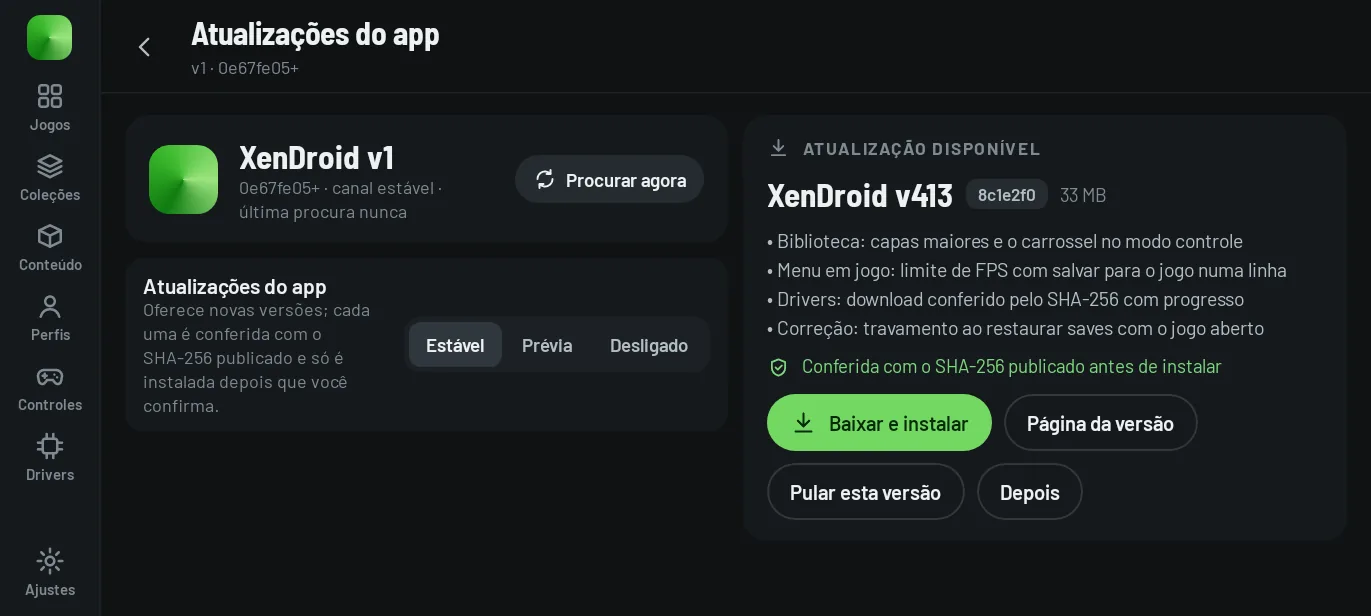
Channels #
In Settings → App → Updates:
- Stable (default): offers the latest published version.
- Preview: also offers previews, which may be less tested.
- Off: never checks.
When the app checks #
- When the app opens, at most once every 5 minutes, and it only shows something if there is a new version. It does not check in debug builds or when the app was opened by a frontend.
- Whenever you ask: library ⋮ menu → Check for updates, on the About screen or in Settings → App → Updates → Check now.
Skip this version makes the app stop offering that version and any earlier one.
Permission to install #
The first update asks for the Install unknown apps permission for Xendroid+. The app opens the system screen; allow it and tap Download and install again. Android's installer always asks for the final confirmation.
Since build 40
The update card shows the summary of changes in the app's language, taken from the release notes.
Versions the app does not offer #
- Old releases tagged
XenDroid-<commit>, without a build number: they never show up as an update. To move off them, install a new version by hand. - Builds you compiled yourself (build number 1): they never get an offer.
Repository checked
The app looks for releases in phforner0/Xendroid-Fork-main, the repository's previous name; the releases now live in phforner0/Xendroid-Plus. GitHub usually redirects the old name to the new one, but this site could not verify that. If Check for updates doesn't find a version that is already in the releases, download the APK from the releases page.
What each version changed #
The notes for each version, with the English summary, are in What's new and release history.