
GPU drivers
System driver or Turnip, where to switch, how packages are downloaded and checked, and the Turnip flags.
Xendroid+ renders with Vulkan. By default it uses the system Vulkan driver, which comes with Android and is always available. On Adreno GPUs you can switch to a custom driver such as Turnip (Mesa's open-source Vulkan driver for Adreno), which is the focus of the project's optimizations.
Adreno only
Custom drivers only load on Adreno GPUs with Qualcomm's KGSL kernel driver. On other devices the Drivers screen says that every game uses the system driver.
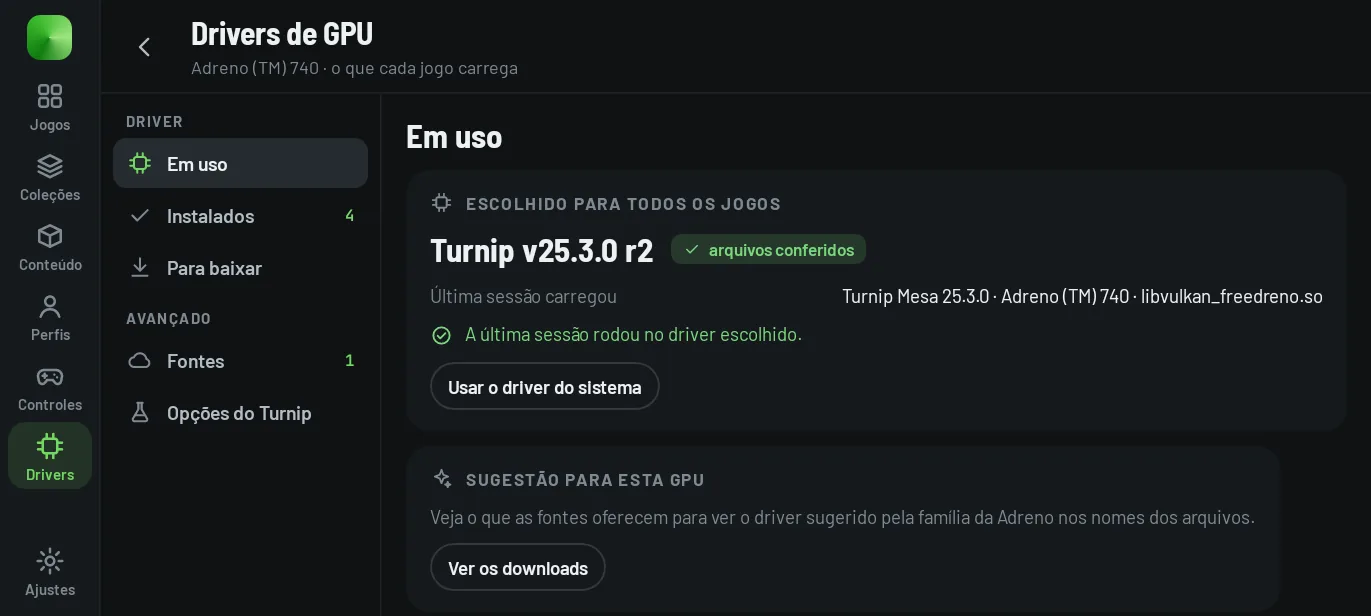
Where to switch #
- Drivers area (in the rail, in landscape; in the Start menu, with a controller; in portrait, via Settings → Summary → Driver → Manage drivers). The choice applies to every game from the next start; the previous one stays one tap away, and Use the system driver goes back to the default.
- Per game: in Details → Driver and Vulkan.
- For one launch only: in Details → Start with… → Driver.
The In use section shows the selected driver and the one the last session actually loaded. If a custom driver did not load (file missing or refused), it warns that the system driver was used. When a game does not start with a custom driver, the failure screen offers Try with the system driver for that launch only.
Download and install #
- Sources: GitHub repositories with driver releases. The default source is
K11MCH1/AdrenoToolsDrivers; you can have up to 8. The app reads published releases (it ignores drafts and pre-releases) and only.zipfiles. - Suggestion for this GPU: based on the file and release names, the exact model comes before the family (for example, a7xx), always from the same family and newest first. The app warns that it is a choice based on names, not a guarantee.
- Import ZIP: installs a package you already have.
Every package is checked before installing:
- the SHA-256, when the release publishes one: the downloaded file has to match; the badge says “SHA-256 published” or “No checksum published”;
- the library has to be Vulkan for 64-bit ARM;
- the ZIP has size limits (64 MB compressed, 256 MB uncompressed) and must name the library in
meta.jsonor contain a single.so.
The package in use cannot be removed. Removing a package deletes its files; to use it again, download or import it again.
Turnip options #
The Turnip flags (the TU_DEBUG variable) are passed to the driver when the next game starts. They apply to every game, and each game can have its own in Details. Qualcomm drivers ignore these flags. The Xendroid+ default is sysmem.
| Flag | What it does |
|---|---|
sysmem | Draws straight to memory instead of in the on-chip tiles (GMEM). Slower, but avoids a class of Adreno GPU hangs. Xendroid+ default. excludes gmem |
gmem | Always draws in the on-chip tiles. Faster where it works; the opposite of sysmem. excludes sysmem |
nolrz | Turns off LRZ, the early depth test. Can fix flickering or missing geometry; costs speed. |
nolrzfc | Turns off only the fast clear of LRZ. A narrower version of nolrz. |
noubwc | Turns off UBWC image compression. Can fix corrupted textures or render targets; more memory traffic. |
nomultipos | Turns off the multi-position output optimization. Can fix stretched or flickering polygons. |
noconcurrentresolves | Does not resolve tiles while the next ones draw. Can fix artifacts on Adreno 7xx; slower. |
noconcurrentunresolves | Does not load tiles while others draw. Can fix artifacts on Adreno 7xx; slower. |
forcebin | Always uses the binning pass in tiled rendering. For diagnosis. |
flushall | Flushes the GPU after every command. Very slow; narrows down which draw hangs the GPU. |
syncdraw | Waits for every draw to finish. Very slow; for diagnosing GPU hangs. |
sysmem and gmem are mutually exclusive. Flags that the app version does not know are left as they are. The last line of the screen shows the final value, such as TU_DEBUG=sysmem.
When to switch #
- Start with the system driver. The first-launch assistant reminds you that it is enough to get started.
- A recent Turnip is usually the path for the project's optimizations on Adreno 7xx and 8xx, and the published measurements were taken with Turnip.
- If the game closes or freezes with a custom driver, try the system driver. The app suggests this by itself after a native crash with a custom driver (see end-of-session suggestions).
The simulator shows the Drivers screen with the sample catalog and the real flags.